Google Business Profile Updates News: Collected Info
Google Business Profile updates news is important for local business owners, marketers, and SEO professionals because even small changes in a profile can affect how customers see a business on Google Search and Google Maps. The latest update getting attention is the new “Collected Info” section inside Google Business Profiles.
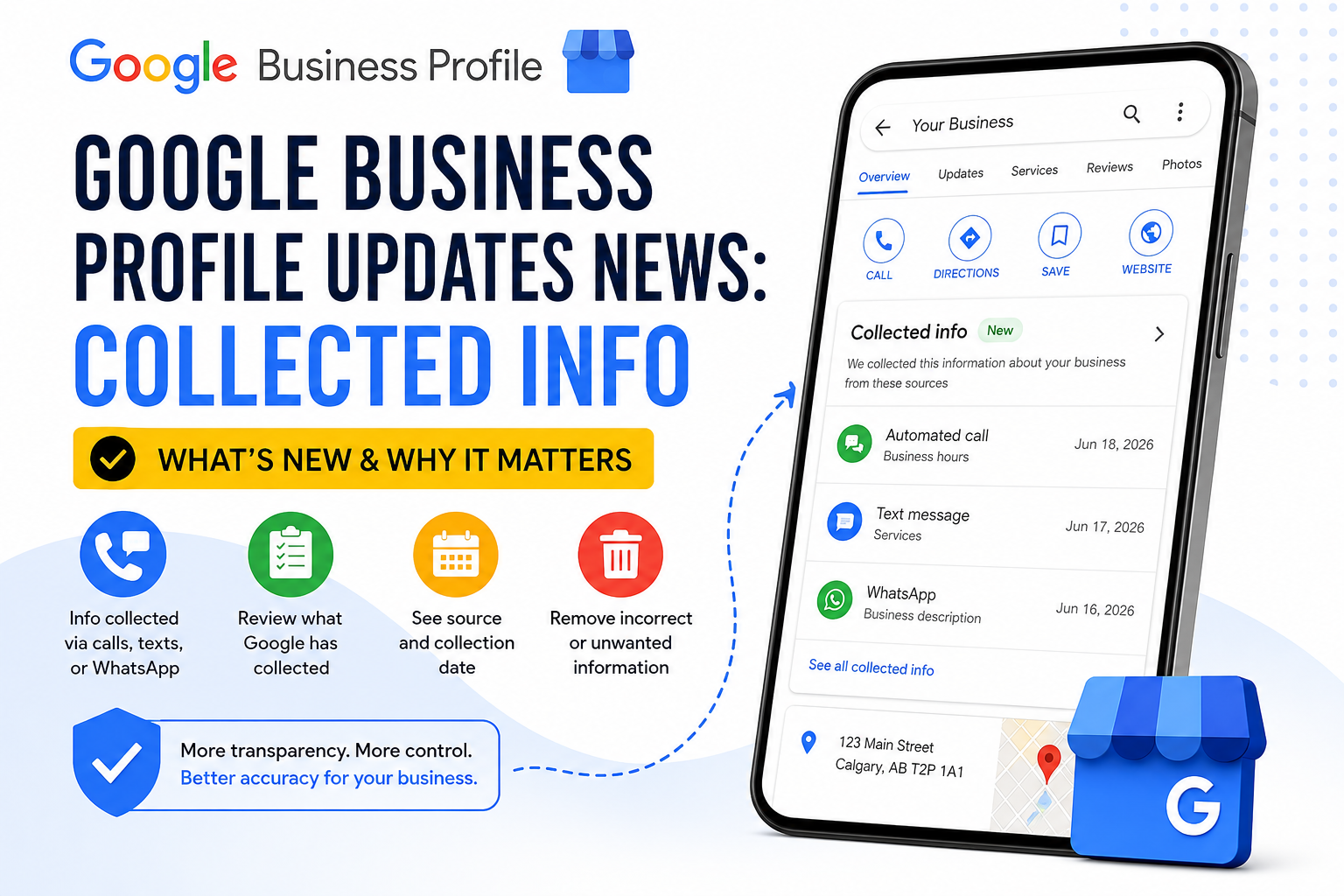
This update is designed to help business owners review information that Google collects or confirms about their business. In simple words, Google may collect business details from different sources, including automated messages, calls, texts, WhatsApp responses, websites, users, and other available information. The new Collected Info area gives business owners more visibility into what Google collected, when it was collected, and where it came from.
For local businesses, this matters because wrong profile information can create real problems. If your opening hours, phone number, services, address, or business details are incorrect, customers may call the wrong number, visit at the wrong time, or choose another business. That is why every business owner should understand this Google Business Profile update and check profile information regularly.
What Is the New Collected Info Section?
The Collected Info section is a new area inside Google Business Profile where business owners may review information that Google has collected about their business. This information may come from automated calls, text messages, WhatsApp messages, websites, user suggestions, or other sources Google uses to keep business profiles accurate Collected info in Google Business Profile.
The main purpose of this feature is to help business owners confirm details and keep their profile updated. Instead of only seeing that Google changed or collected something, owners may be able to review the source and collection date of that information.
This is useful because Google Business Profile details are not always controlled only by the business owner. Google can use different signals to update or suggest changes. The Collected Info section gives owners a better way to understand what is being collected and decide whether it is accurate.
Why This Google Business Profile Update Matters
This update matters because Google Business Profile is often the first place customers see a local business. A customer may search for “restaurant near me,” “plumber open now,” “cleaning company in Calgary,” or “digital marketing agency near me” and make a decision based on what appears in Google Search or Maps.
If your business profile has outdated or wrong details, you may lose leads without even knowing. For example, incorrect hours can make customers think your business is closed. A wrong phone number can stop calls. A wrong service listing can confuse people. A missing update can make your profile look less trustworthy.
The Collected Info feature helps business owners monitor these details more carefully. It also shows that Google is moving toward more active profile verification, where business information may be checked and updated from multiple sources.
How Google May Collect Business Profile Information
Google may collect or confirm business information in different ways. Some information may come from the business owner directly. Other information may come from public websites, user suggestions, third-party data sources, customer activity, or Google’s own interactions with the business.
Google may also contact the verified phone number on a Business Profile through automated calls, texts, or WhatsApp messages to confirm details. These messages may ask about information such as business hours, services, availability, or other basic profile details.
If the business responds, Google may use that information to update or improve the profile. This is why business owners should make sure that the phone number on their profile is correct and managed by someone who understands the business.
What Business Owners Can See in Collected Info
The Collected Info section may allow business owners to review important details about collected information. This can include the information Google collected, the date it was collected, and the source of the information.
This is a useful improvement because it gives more transparency. In the past, business owners often noticed that profile details had changed but were not always sure where the change came from. With collected information visibility, owners may better understand whether the information came from a call, message, or another source.
Business owners may also be able to remove collected information if it is not correct or not intended for the profile. This gives more control over unwanted or inaccurate updates.
How to Check Collected Info in Google Business Profile
If the feature is available for your business, you can check it by going to your Google Business Profile.
The general process is:
- Sign in to the Google account connected to your Business Profile.
- Open your Business Profile.
- Select “Edit profile.”
- Look for the “Collected info” section.
- Review the information, source, and collection date.
- Delete any collected information that is incorrect or not useful.
This feature may not appear for every business yet. Google has stated that availability can depend on region, language, and business category. If you do not see it now, it may become available later.
Difference Between Google Updates and Collected Info
Google updates and Collected Info are related, but they are not exactly the same.
Google updates usually refer to changes or suggested changes that Google applies to a Business Profile based on different sources. These updates may appear in your profile editor and may show that Google changed certain business details.
Collected Info is more focused on information Google has gathered or confirmed. It gives business owners a way to review the collected details, understand the source, and remove information if needed.
In simple terms, Google updates are about profile changes, while Collected Info is about reviewing information Google collected before or around those changes Google updates on your Business Profile.
Why Local SEO Professionals Should Pay Attention
Local SEO professionals should pay attention to this update because Business Profile accuracy is a major part of local search visibility and customer trust. A profile with wrong details can damage user experience and reduce conversions.
For agencies managing multiple client profiles, this update creates a new review task. It is no longer enough to check only the business name, category, address, phone number, and hours once. Agencies should also check whether Google has collected new information and whether that information is accurate digital marketing agency guide.
This is especially important for businesses with many locations, changing hours, seasonal services, appointment-based services, or high customer interaction. If Google collects outdated or incomplete information, it may affect how the business appears to customers.
What Small Businesses Should Do Now
Small business owners should treat this update as a reminder to review their Google Business Profile more often. A profile should not be created once and forgotten. It should be checked regularly, especially if your business depends on calls, directions, bookings, visits, or local leads small business tools guide.
Start by checking your core details:
- Business name
- Primary category
- Address or service area
- Phone number
- Website URL
- Opening hours
- Special hours
- Services
- Products
- Photos
- Business description
- Social media links
- Appointment or booking links
After checking these basics, look for Google updates or the new Collected Info section. If something is inaccurate, fix it quickly.
How This Update Can Affect Customer Trust
Customers trust Google Business Profile information when making quick decisions. If the profile says a business is open, customers expect it to be open. If the profile shows a service, customers expect the business to offer that service. If the phone number is listed, they expect someone to answer.
Wrong information can create frustration. It can also lead to negative reviews if customers feel misled. This is why profile accuracy is not only an SEO issue; it is also a customer experience issue.
The Collected Info update can help businesses protect trust by reviewing collected details before they create confusion.
Common Mistakes to Avoid
One common mistake is ignoring Google Business Profile notifications. If Google collects or updates information, the business owner should review it instead of assuming it is correct.
Another mistake is letting staff members answer automated calls or messages without guidance. If someone gives incomplete or wrong information, it may affect the business profile. Make sure the person handling calls or messages understands business hours, services, and important details.
A third mistake is using inconsistent business information across the website, social media, directories, and Google Business Profile. If your website says one thing and your profile says another, Google may collect or suggest updates based on mixed signals.
Business owners should also avoid keyword stuffing in business names, categories, or descriptions. Google wants accurate business information, not spammy profile optimization.
Best Practices for Google Business Profile in 2026
To keep your profile strong, follow simple best practices:
Keep your business details updated. Review your hours, services, phone number, and website regularly.
Use accurate categories. Your primary category should match your main business service.
Add fresh photos. Photos help customers understand your business and build trust.
Respond to reviews. Review responses show that the business is active and cares about customers.
Check Google updates. If Google changes or suggests information, review it quickly.
Monitor Collected Info. If the section appears in your account, review collected data and remove incorrect information.
Keep your website consistent. Your website should match your Business Profile details create posts on your Business Profile.
Is This Update Good for Businesses?
Yes, this update can be helpful if business owners use it properly. It gives more visibility into the information Google collects and helps businesses protect profile accuracy.
However, it also means business owners need to pay closer attention. If a profile is ignored, inaccurate information may stay visible longer than it should. Businesses that actively manage their profiles will have a better chance of keeping customer-facing details accurate.
For local SEO, this update supports the idea that Google Business Profile management is becoming more active and data-driven. Businesses should check their profiles regularly, not only when something goes wrong.
Final Thoughts
The latest Google Business Profile updates news shows that Google is giving business owners more visibility into collected business information. The new Collected Info section can help owners review what Google collected, when it was collected, and where it came from.
For small businesses, this update is important because accurate profile information can directly affect calls, visits, bookings, and customer trust. For local SEO professionals, it creates another important area to monitor when managing client profiles.
If your business depends on local visibility, check your Google Business Profile often. Keep your information accurate, review Google updates, monitor collected information, and make sure your website and profile details match. A well-maintained Business Profile can help customers find, trust, and contact your business more easily.
FAQs
What is the latest Google Business Profile update?
The latest Google Business Profile update includes a Collected Info section that lets some business owners review information Google collected about their business, including the source and collection date.
What does Collected Info mean in Google Business Profile?
Collected Info means business information that Google has gathered or confirmed from sources such as automated calls, texts, WhatsApp messages, websites, user input, or other available data.
Is Collected Info available for all businesses?
No, the feature may only be available for selected regions, languages, and business categories. Some business owners may not see it yet.
How do I check Collected Info in my Google Business Profile?
Go to your Business Profile, select Edit profile, and look for the Collected info section. If available, you can review the information, source, and date.
Can Google update my Business Profile automatically?
Yes, Google may update Business Profile details based on information from different sources. Business owners should review updates regularly to make sure details are correct.
Why is Google Business Profile important for local SEO?
Google Business Profile helps businesses appear on Google Search and Maps. Accurate details, reviews, photos, categories, and updates can improve customer trust and local visibility.