Magic School AI: Beginner Guide for Teachers and Students
Magic School AI is becoming a popular topic in education because teachers, students, and schools are looking for easier ways to use artificial intelligence in learning. Many educators spend hours creating lesson plans, worksheets, quizzes, rubrics, feedback, emails, and classroom activities. AI tools can help reduce some of that workload when they are used carefully and responsibly.
When people search for Magic School, they usually want to understand what it is, how it works, whether it is useful for teachers, and how students can use it safely. In simple words, Magic School AI is an education-focused AI platform designed to support teachers with planning, content creation, student support, and classroom productivity.
This guide explains Magic School AI in an easy way, including its main features, benefits, uses, limitations, safety concerns, and tips for beginners.
What Is Magic School AI?
Magic School AI is an artificial intelligence platform created for education. It gives teachers access to AI-powered tools that can help with everyday teaching tasks. Instead of using a general AI chatbot for everything, teachers can use specific tools made for classroom needs.
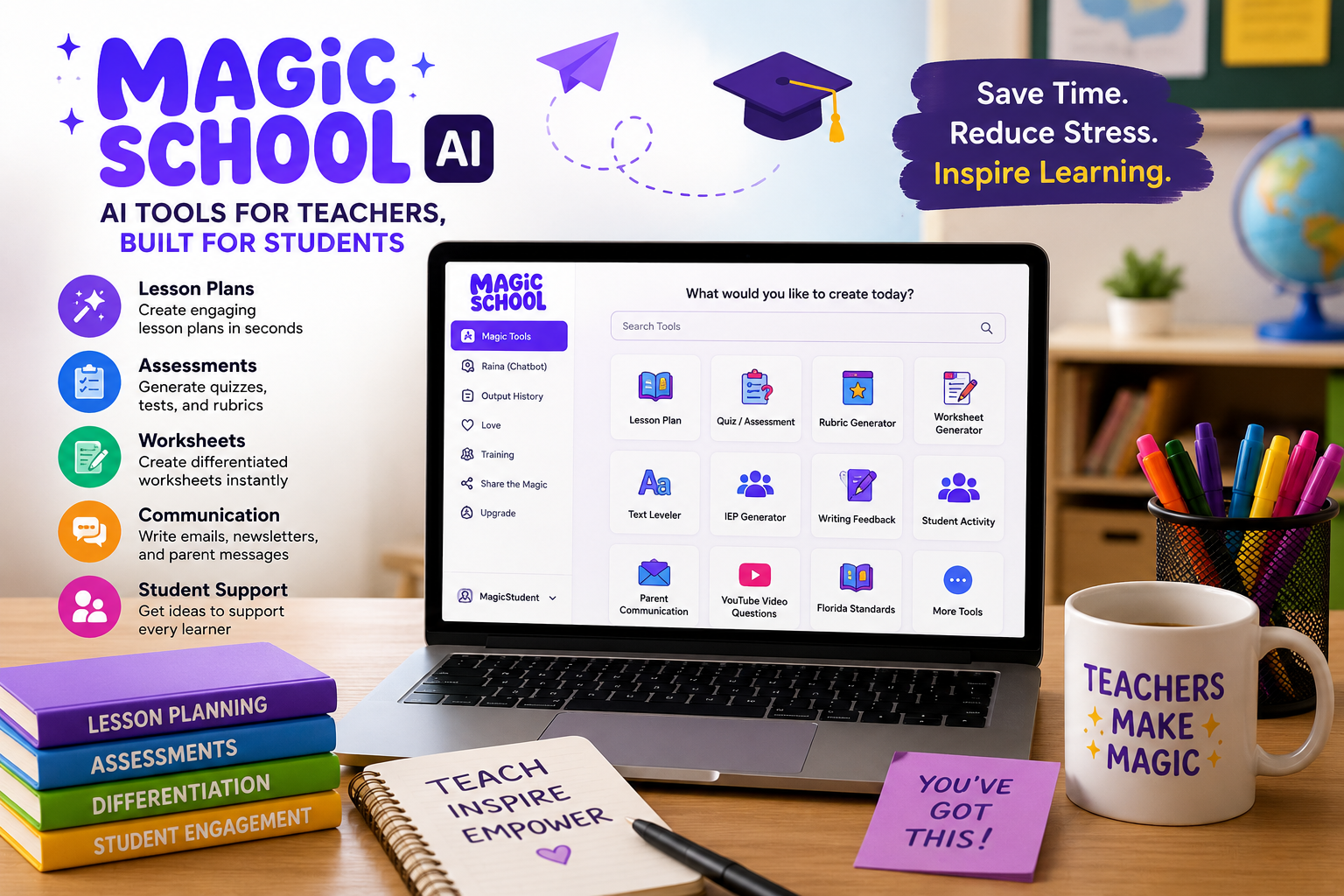
For example, a teacher can use Magic School AI to create a lesson plan, generate quiz questions, make a rubric, write a student-friendly explanation, adjust reading level, create discussion questions, or draft parent communication MagicSchool AI platform.
The main goal is not to replace teachers. The goal is to save time and help teachers prepare better learning materials. A teacher still needs to review, edit, and personalize the AI output before using it in class.
Why Magic School AI Is Getting Attention
Magic School AI is getting attention because many teachers are facing heavy workloads. Lesson planning, grading, feedback, differentiation, classroom communication, and assessment preparation can take a lot of time.
AI tools can help with first drafts and routine tasks. For example, instead of starting a worksheet from zero, a teacher can generate a draft and then edit it. Instead of writing a rubric manually, the teacher can create a starting version and adjust it based on class needs.
Another reason Magic School AI is popular is that it is focused on education. Many teachers want AI tools that understand classroom language, grade levels, learning goals, and student support needs.
Quick Overview of Magic School AI
| Feature | What It Helps With |
|---|---|
| Lesson plan generator | Creating structured lesson plans |
| Rubric maker | Building grading rubrics |
| Quiz maker | Creating assessment questions |
| Worksheet generator | Making classroom practice materials |
| Text leveler | Adjusting reading difficulty |
| Student Rooms | Allowing student AI use in controlled spaces |
| Writing feedback | Helping teachers review student writing |
| Communication tools | Drafting messages for families or staff |
| AI literacy support | Teaching responsible AI use |
How Teachers Can Use Magic School AI
Teachers can use Magic School AI in many practical ways. The most common use is planning. A teacher may enter a topic, grade level, learning objective, and time limit. The tool can then create a basic lesson structure.
Teachers can also use it for assessment. For example, they can generate multiple-choice questions, exit tickets, short-answer questions, or discussion prompts.
Another useful area is differentiation. If students in the same class have different reading levels, Magic School AI can help adjust text to make it easier or more challenging. This can help teachers support different learners without writing every version manually.
Magic School AI for Lesson Planning
Lesson planning is one of the most time-consuming teaching tasks. A good lesson needs objectives, activities, materials, assessment, timing, and student engagement.
Magic School AI can help by creating a first draft of a lesson plan. A teacher can then review the plan and make changes based on classroom reality.
For example, if the lesson is about photosynthesis, the teacher can ask for a 45-minute lesson plan for middle school students. The output may include an introduction, activity, explanation, practice task, and exit ticket.
This saves time, but teacher review is still important. AI may create a useful structure, but it does not know every student, classroom situation, or school requirement.
Magic School AI for Quizzes and Assessments
Teachers can use Magic School AI to create quizzes, formative assessments, and review questions. This is helpful when teachers need quick checks for understanding.
For example, a teacher can generate:
- Multiple-choice questions
- True or false questions
- Short-answer questions
- Exit tickets
- Vocabulary checks
- Reading comprehension questions
- Review questions before a test
Assessment tools can save time, but teachers should check accuracy. AI-generated questions may need editing for clarity, difficulty, and curriculum alignment.
Magic School AI for Rubrics
Rubrics help students understand how their work will be graded. They also help teachers grade more consistently. However, creating a clear rubric can take time.
Magic School AI can generate rubric drafts for essays, projects, presentations, group work, creative assignments, or classroom activities.
A teacher can customize the rubric by adding criteria such as content accuracy, organization, creativity, grammar, participation, or presentation skills.
The best practice is to treat AI-generated rubrics as a starting point. Teachers should adjust the language, scoring levels, and expectations before sharing them with students.
Magic School AI for Student Support
Magic School AI can also help teachers support students in different ways. It can simplify text, create examples, generate practice problems, provide feedback ideas, or help explain difficult concepts.
For example, if a student struggles with a complex reading passage, the teacher can generate a simpler version. If a student needs extra practice, the teacher can create additional questions. If a class needs vocabulary support, the teacher can generate definitions and examples.
This can be useful for differentiation, but it should be used carefully. Student needs are personal, and teachers should make final decisions.
What Are Student Rooms?
Student Rooms are controlled spaces where teachers can choose AI tools for students to use. This can help students learn how to use AI responsibly instead of using random AI tools without guidance.
A teacher can set learning goals, choose specific tools, and guide how students interact with AI. This is useful because students need AI literacy, not just access to AI MagicSchool for students.
Student-facing AI tools should always be used with clear rules. Students should understand that AI can make mistakes, should not replace their thinking, and should not be used for cheating.
Benefits of Magic School AI
Magic School AI can offer several benefits when used responsibly.
First, it can save time. Teachers can create drafts faster and spend more time refining materials instead of starting from zero.
Second, it can support creativity. AI can suggest activity ideas, discussion prompts, and lesson formats that teachers can adapt.
Third, it can help with differentiation. Teachers can adjust content for different reading levels or learning needs.
Fourth, it can support communication. Teachers can draft parent emails, classroom updates, and student feedback more quickly.
Fifth, it can help students build AI literacy when teachers guide the process.
Limitations of Magic School AI
Magic School AI is useful, but it is not perfect. Like all AI tools, it can make mistakes. It may produce inaccurate facts, unclear instructions, or content that does not fully match the curriculum.
AI may also create materials that sound good but are too generic. Teachers should always personalize the output based on their students, subject, grade level, and classroom goals.
Another limitation is overdependence. Teachers and students should not rely on AI for every task. AI should support learning, not replace thinking, creativity, or professional judgment.
Is Magic School AI Safe for Students?
Safety depends on how the tool is used, what settings are enabled, and how schools manage AI access. Student use of AI should include privacy protection, teacher monitoring, clear rules, and responsible use guidelines.
Teachers should avoid putting sensitive student information into AI tools unless the school has approved the platform and privacy policies. Schools should also teach students not to share personal data, private details, or passwords with AI systems.
The safest approach is guided use. Students should use AI with teacher direction, clear learning goals, and review.
Magic School AI vs General AI Tools
Magic School AI is different from general AI tools because it is designed for education. General AI tools can answer many types of questions, but they may not always understand classroom structure or teaching needs.
Magic School AI provides tools that are more specific to teaching tasks, such as lesson planning, rubric creation, quiz generation, text leveling, and student feedback.
This makes it more useful for teachers who want ready-made education workflows instead of writing long prompts from scratch.
Common Mistakes Teachers Should Avoid
One common mistake is using AI output without checking it. Every AI-generated lesson, quiz, rubric, or explanation should be reviewed before it is used.
Another mistake is entering private student information into AI tools without approval. Teachers should follow school policies and privacy rules.
A third mistake is letting students use AI without guidance. Students need to understand when AI is helpful and when it becomes academic dishonesty.
Teachers should also avoid making every lesson AI-generated. Human teaching, classroom discussion, creativity, and student relationships are still essential.
Tips for Using Magic School AI Better
To get better results, teachers should give clear instructions. Instead of typing “make a lesson,” include the grade level, subject, topic, lesson length, student needs, and learning objective.
For example:
“Create a 40-minute grade 6 science lesson on the water cycle with a warm-up, group activity, vocabulary support, and exit ticket.”
This type of prompt gives the tool more direction.
Teachers should also edit the output. Add examples from your own classroom, adjust language for students, and make sure the content fits your teaching style.
Magic School AI for Beginners
Beginners should start with simple tools. Lesson plan generator, rubric maker, quiz maker, and text leveler are good starting points.
Start with one task that takes time every week. Use AI to create a draft. Then edit it and compare how much time it saves.
Do not try to use every feature at once. Learning one or two tools properly is better than opening many tools and feeling confused online learning skills for beginners.
Should Schools Use Magic School AI?
Schools can use Magic School AI if they have clear goals, privacy rules, training, and responsible AI policies. AI tools should not be introduced without planning.
School leaders should consider:
- How teachers will be trained
- What student data can be used
- Which tools are approved
- How student use will be monitored
- How AI literacy will be taught
- How accuracy will be checked
- How parents will be informed
With proper planning, AI tools can support teachers. Without planning, they can create confusion or risk.
Final Thoughts
Magic School AI is an education-focused AI platform that helps teachers save time, create classroom materials, support students, and build AI literacy. It can be useful for lesson planning, quizzes, rubrics, worksheets, feedback, communication, and differentiated learning.
However, it should be used responsibly. Teachers should review all AI-generated content, protect student privacy, follow school policies, and guide students carefully.
For anyone searching for Magic School, the key point is simple: it is not a replacement for teachers. It is a tool that can support teachers when used with human judgment, creativity, and care.
FAQs
What is Magic School AI?
Magic School AI is an education-focused AI platform that helps teachers create lesson plans, quizzes, rubrics, worksheets, feedback, and classroom materials.
Is Magic School AI for teachers or students?
Magic School AI is mainly designed for teachers, but it also offers student-facing tools through controlled spaces such as Student Rooms.
Can Magic School AI create lesson plans?
Yes, teachers can use Magic School AI to generate lesson plan drafts based on grade level, topic, objectives, and class needs.
Is Magic School AI free?
Magic School AI may offer free and paid options depending on available plans and features. Users should check the official pricing page for current details.
Is Magic School AI safe for students?
It can be used safely when schools manage privacy, permissions, teacher monitoring, and responsible AI rules. Students should use AI under guidance.
Does Magic School AI replace teachers?
No. Magic School AI can support teachers, but it does not replace human teaching, classroom judgment, student relationships, or professional experience.
What are the best Magic School AI tools for beginners?
Good beginner tools include lesson plan generator, rubric maker, quiz maker, worksheet generator, text leveler, and writing feedback tools.